ATO Payday Super Changes
Since 1 July 2026, employers must pay super with each pay run. Contributions have to reach the fund within seven business days of payday.
Learn MoreKeep your tax plan in one spreadsheet.
The Sole Trader Tax Toolkit brings your set-aside estimates, selected deductions and key dates into one reusable file. Save your own copy and update it as your income and expenses change.
We are updating the Toolkit and its checkout. Existing buyers can contact us with their receipt.
See all three tools before buying
Need a quick estimate? Use the free set-aside calculator.
For Australian resident sole traders with business income only. See the assumptions below.
Sound familiar?
The bill lands and the money's gone
You earned well all quarter. Then the BAS or tax bill arrives and the cash it needed was spent months ago. That knot in your stomach is the most common sole trader story in Australia.
Every invoice is a guess
How much belongs in the tax account? Without a plan, it is easy to put aside too much for cash flow or too little for the bill.
Deductions you know you missed
Receipts in the glovebox, claims you forgot existed, money left on the table every single year because nothing kept the list for you.
The Toolkit turns all three into a number, a checklist and a calendar. Update your plan as the year changes.
What's inside
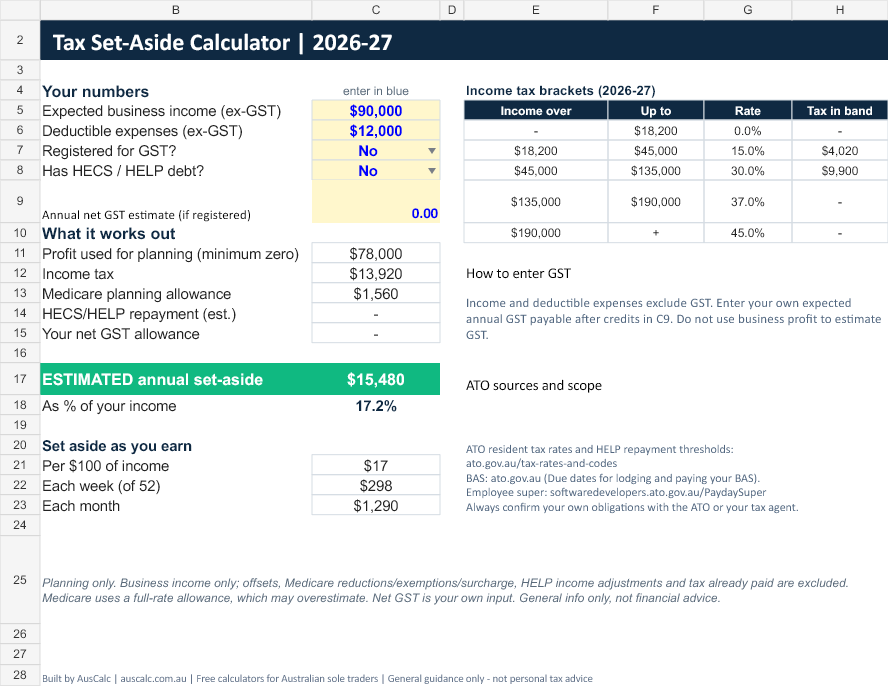
Tax Set-Aside Calculator
Enter annual income and deductible expenses excluding GST. See an estimated set-aside per week and month, with your own net GST allowance if registered.
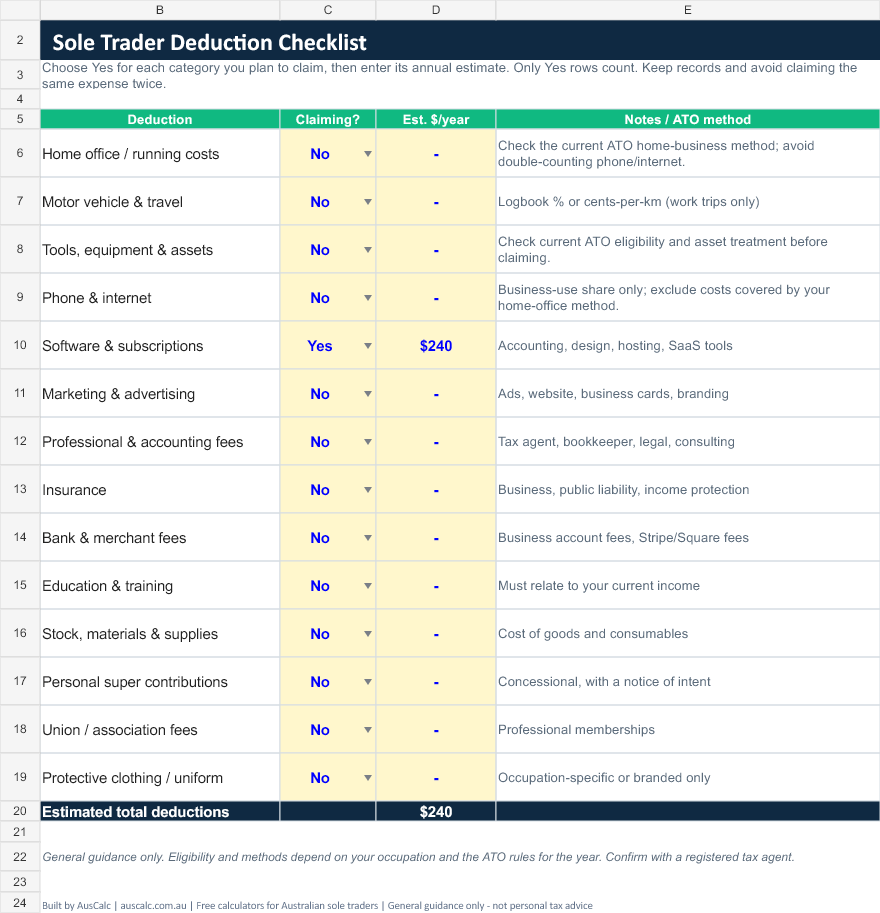
Deduction Checklist
Choose the deduction categories you plan to claim and enter annual estimates. Only selected categories count in the total. Keep your supporting records separately.
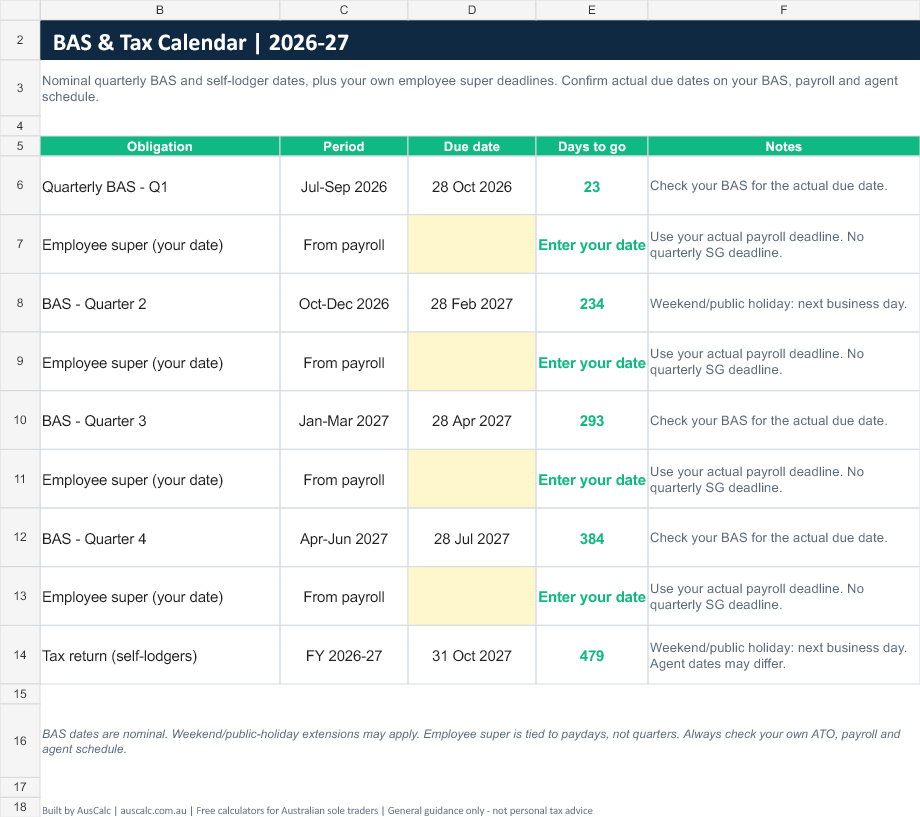
BAS & Tax Calendar 2026-27
Keep nominal quarterly BAS and self-lodger dates together. Add actual employee super deadlines from payroll, and confirm your own ATO or agent schedule.
This is the actual file
Preview the spreadsheet with example inputs. Blue cells are yours to edit; the calculation and total cells are protected in the Excel file.
Yours in two minutes
Pay securely with PayPal
Review your one-off payment in PayPal checkout. No AusCalc account is required.
Download instantly
After payment is confirmed, download on the order page. Your Toolkit email provides a link for later downloads.
Type your income. Done.
Save a copy and start on the Start Here tab. Enter your annual estimates in the blue cells, then review them as your business changes.
One reusable file for your own planning. Keep using the free calculator for a quick estimate, or buy the spreadsheet to keep your set-aside plan, deduction checklist and calendar together.
We are updating the Toolkit and its checkout. Existing buyers can contact us with their receipt.
- Set-aside planning with resident brackets, a Medicare allowance and HELP estimates
- An estimated percentage of annual income, plus weekly and monthly amounts
- Deduction checklist with selected-category totals and method notes
- BAS and tax calendar, with editable employee super dates
- Excel .xlsx file. No macros or add-ins. Read the setup notes before importing elsewhere
- Yours forever. No subscription, no account, no lock-in
Questions, answered
What exactly do I get?
One Excel spreadsheet (.xlsx) with a set-aside planning calculator, a selected-deduction checklist and a BAS and tax calendar. Download after payment is confirmed and keep your own copy.
Does it work in Google Sheets and Excel?
The download is an Excel .xlsx file with no macros or add-ins. You can import a copy into Google Sheets, but check its formulas, input validation and date display after import. Spreadsheet protection may not carry across.
Is it a subscription?
No. It is a one-off $19 purchase. You pay once, you own the file, and the full 2026-27 financial year is covered.
Is my data private?
AusCalc does not receive the figures you enter in the downloaded file. A local Excel copy stays on your device; a Google Sheets copy is stored in your own Google account. Payment and delivery use your order details and checkout email.
How do I get the file after paying?
After PayPal payment is confirmed, the order page provides your download. We also send a Toolkit email to your checkout email address with a link to re-download. Existing buyers from our earlier checkout can contact us with their PayPal receipt.
Who will I see on my PayPal receipt?
Our registered company name. You can find it on our About page.
What does the set-aside estimate leave out?
It models business income only. Tax offsets, Medicare reductions or exemptions, the Medicare levy surcharge, other income, HELP repayment-income adjustments and amounts already paid are excluded. Net GST is an estimate you enter yourself. Use your accountant or the ATO for your final position.
Is this tax advice?
No. The Toolkit gives general guidance and estimates built on current ATO rates for 2026-27. Always confirm your position with a registered tax agent before lodging.
General info only, not financial advice. Planning estimates for 2026-27, not a final tax bill. Verify with a registered tax agent before lodging or making decisions.